Shopify appsApp Store listing
All-in-One Support Button icon

Digiware Solutions

All-in-One Support Button

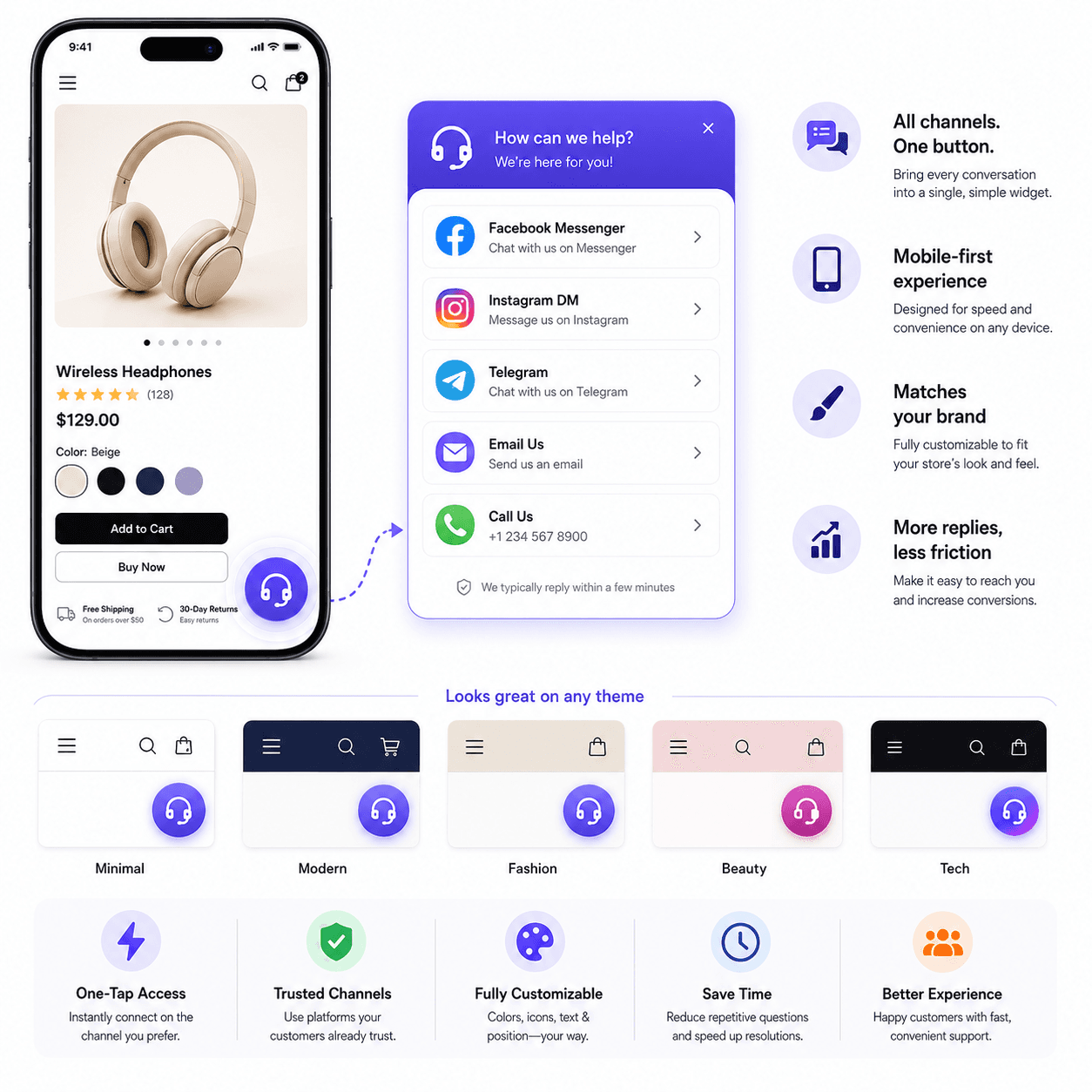
One widget for Facebook, Instagram, Telegram, email, and phone.

Give shoppers a single, branded entry point to reach your team on the channels they already use—reducing friction on mobile and cutting down “where do I contact you?” abandonment.

  • Multi-channel contact options in one tap
  • Brand-aligned presentation that fits most themes
  • Lower friction for mobile buyers who need quick answers
High-touch brandsSocial-first storesSmall support teamsMobile-heavy traffic
apps.shopify.com
All-in-One Support Button Shopify app widget connecting shoppers to social, chat, and email support

Meet customers on their preferred channel—without rebuilding your entire help center.

At a glance

  • Multi-channel contact options in one tap
  • Brand-aligned presentation that fits most themes
  • Lower friction for mobile buyers who need quick answers
Overview

What All-in-One Support Button solves

The All-in-One Support Button turns your support links into a lightweight storefront widget. Customers pick the channel that fits the moment—social, messaging, email, or phone—without hunting through footer clutter.

Ready to install?

Available on the Shopify App Store—install in minutes and configure from your Shopify admin.

01

Support discovery is a conversion problem

When a shopper hesitates before checkout, the fastest win is often a credible, low-effort way to ask a question. If your contact paths are scattered, you lose the sale to doubt—not to price.

A single support entry point reduces cognitive load: buyers feel reassured that a human is reachable, especially for made-to-order products, sizing questions, and delivery promises.
02

Operational simplicity for merchants

Support tools should not become a maintenance burden. The widget approach keeps routing predictable for your team while still honoring the channels you already monitor.

Digiware builds Shopify apps with pragmatic UX—fast setup, clear configuration, and styling controls that help the experience feel native to your brand.

Capabilities

Features merchants rely on

Outcomes and capabilities built for production storefronts—not demo-only workflows.

  • 01

    Consolidates multiple contact destinations into one UI pattern

  • 02

    Improves mobile UX for pre-purchase questions

  • 03

    Helps reduce repetitive “how do I reach you?” inquiries

  • 04

    Supports social and messaging channels shoppers already use

  • 05

    Useful for lean teams without a full omnichannel desk

  • 06

    Complements email helpdesks and ticketing tools

  • 07

    Brand-forward presentation options

  • 08

    Built and maintained by Digiware Solutions

Use cases

Who it's for

All-in-One Support Button is a strong fit when your team matches one of these storefront workflows.

  • High-touch brands
  • Social-first stores
  • Small support teams
  • Mobile-heavy traffic
  • Social-first brands

    Route shoppers to Instagram, Facebook, or Telegram in one tap.

  • High-consideration products

    Reduce pre-purchase anxiety with visible support access.

  • Small support teams

    Consolidate contact channels without a heavy helpdesk rollout.

FAQ

Questions before you install

Quick answers for merchants comparing All-in-One Support Button on the Shopify App Store.

  • It is a front-door widget for channel selection—not a full ticketing system. Many merchants pair it with email or a helpdesk behind the scenes.

  • Yes. Merchants typically align colors and placement so the widget feels like part of the theme rather than an afterthought.

  • The experience is designed for mobile shoppers who need quick access to support while browsing and checking out.

More from Digiware

View all apps

Need a custom Shopify app?

We build public App Store apps and private merchant tools—checkout extensions, ERP sync, AI workflows, and fulfillment integrations tailored to your stack.